

Sections and roles
Permissions in Export119 are organized into sections. Each section is a logical area of the platform — cars, invoicing, vaults, ledger, etc. — and each user role gets per-section RWED flags: Read / Write (create) / Edit / Delete.
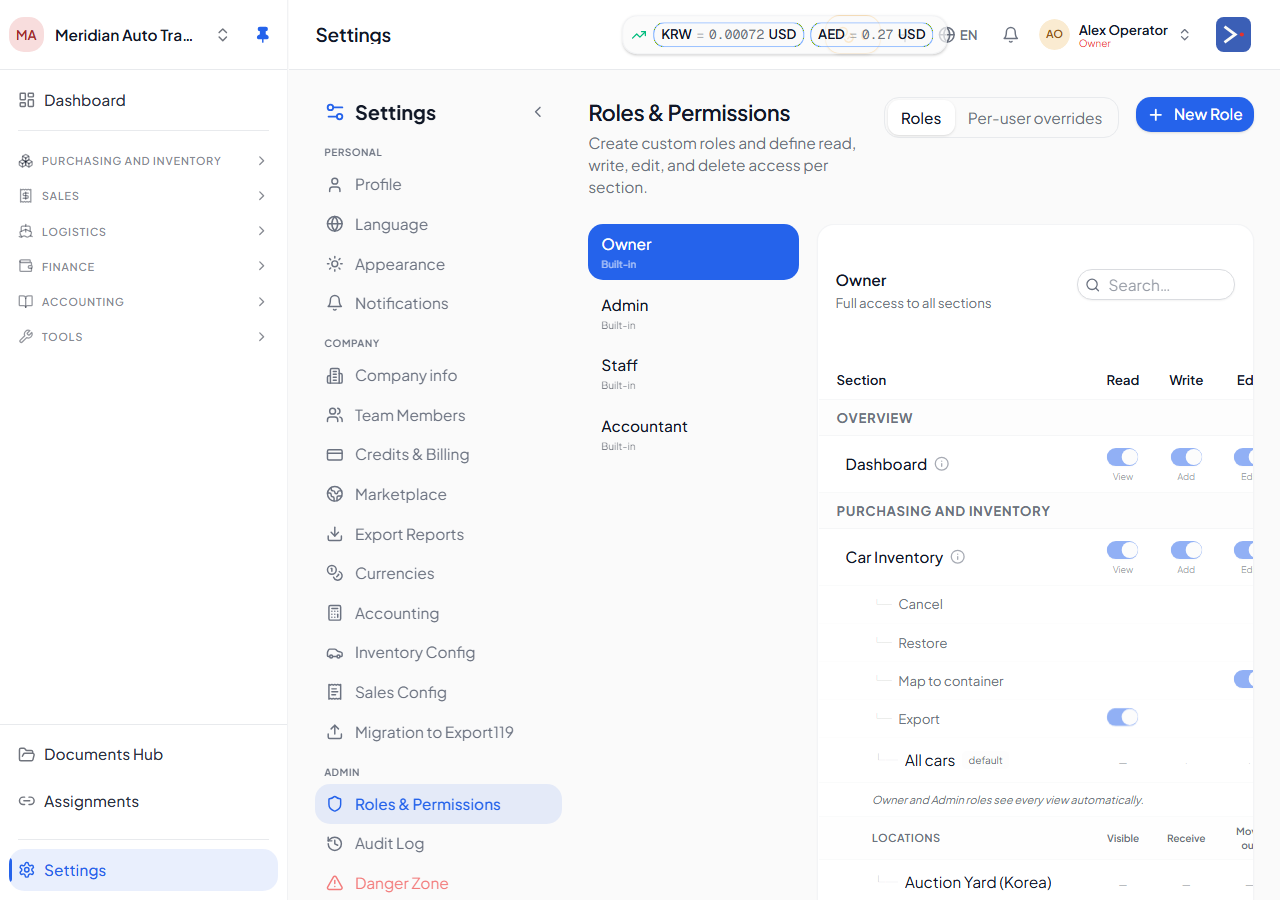
The section list
Section titled “The section list”Sections visible in the Roles & Permissions matrix (~29 today; the canonical list lives in the platform’s section registry, not here — new sections get added as the platform grows):
| Section | Surface |
|---|---|
dashboard | The home dashboard widgets |
vaults | Vaults page + transactions |
payables | Amounts owed to suppliers |
counterparties | Suppliers, buyers, and other contacts |
cars | Cars inventory page + per-car detail |
shipping | Shipment Journey overview |
shipping_book | Booking requests |
shipping_schedules | Shipping schedules (forwarder side) |
rfq_inbox | Incoming freight quote requests |
forwarder_profile | Forwarder company profile |
ledger | General ledger + manual journal entries |
chart_of_accounts | Chart of Accounts |
financial_reports | Trial balance, balance sheet, P&L |
ai_assistant | AI assistant |
export | Data export |
admin | Platform-admin-only sections |
settings | Company / team / cost types / etc. |
quotations | Sales quotations |
proforma_invoices | Proforma invoices |
invoices | Issued invoices |
invoice_payments | Payments received against invoices |
received_documents | Documents received from counterparties |
customs_permits | Customs broker queue |
customs_clearances | Customs clearance records |
cfs_loading | CFS / yard loading |
assignments | Shipment assignments |
documents | Shared documents |
safe_freight_tool | Korea safe-freight rate tool |
migration_export119 | Migration wizard (trading-only) |
There is no single invoicing section — it’s split into quotations, proforma_invoices, invoices, and invoice_payments so a role can, say, issue invoices without seeing quotations. Likewise there’s no containers or fx_exchange section by that name.
The visible set per role also depends on company type — a forwarder doesn’t see cars because forwarders don’t carry inventory.
RWED meanings
Section titled “RWED meanings”| Flag | What it controls |
|---|---|
| Read | View the page, list data, run reports. |
| Write | Create new entities (new car, new invoice, new vault). |
| Edit | Modify existing entities (inline cell edit, change status via action, edit invoice draft). |
| Delete | Delete or cancel entities (delete vault tx, cancel car, void invoice). |
A common confusion: the inline pencil-edit affordance is gated on cars:edit, NOT cars:write. Write means “create new”; Edit means “modify existing”. This trips up new admins who give Sales cars:write and wonder why they can’t fix typos.
Role types
Section titled “Role types”Every role in Export119 falls into one of three buckets:
- Owner — full access, bypass every permission gate. Set at sign-up (the user who created the company). At least one owner must exist.
- Admin — full access except platform-admin actions. Bypasses section permissions.
- Custom — bounded by section permissions and (optionally) per-view, per-vault, per-location ACLs.
Both Owner and Admin are “bypass” roles in the matrix — they show ”—” in every column because the matrix doesn’t gate them.
Section groups
Section titled “Section groups”Some sections cluster in the sidebar — Accounting (Ledger + Chart of Accounts + Financial Reports), Invoicing (sub-pages), Car Inventory (parent + dynamic per-view children). Section groups have a master toggle that toggles all children on/off in one click.
The contract
Section titled “The contract”When a user calls a tRPC procedure (e.g., cars.inlineUpdate), the server middleware calls requireSectionPermission(ctx, "cars", "edit"). If the user’s role doesn’t have cars:edit = true, the request fails with a 403 before any business logic runs. Hiding the menu item isn’t enough — the server is the canonical gate.
Related
Section titled “Related”- Per-view & per-vault ACL — inner gates
- Role presets — owner / admin / custom
- Audit & troubleshooting — “why can’t they see X?”
Change log
Updated on Feature / change Reason 2026-07-07 Rewrote the section list to the current ~29 real sections; noted invoicing is split (quotations/proforma_invoices/invoices/invoice_payments), no currencies/containers/fx_exchangesection; fixed stale appTouchpoints; added the admin-customizable sidebar layout noteCode audit found the page described a retired/incomplete section set and stale file paths