

Tracking
Each container or RORO trip has a physical lifecycle separate from the trader’s view of “where is my car.” Tracking shows both.
Container / RORO statuses
Section titled “Container / RORO statuses”The trip record itself carries a simple 5-value status:
| Status | Meaning |
|---|---|
booking | Forwarder confirmed the booking; this is the starting status. |
loading | Cars are being (or have been) loaded at the origin terminal. |
shipped | On the vessel, en route. |
arrived | Reached the destination terminal. |
cleared | Customs cleared and handed off. |
RORO trips use the same 5 values.
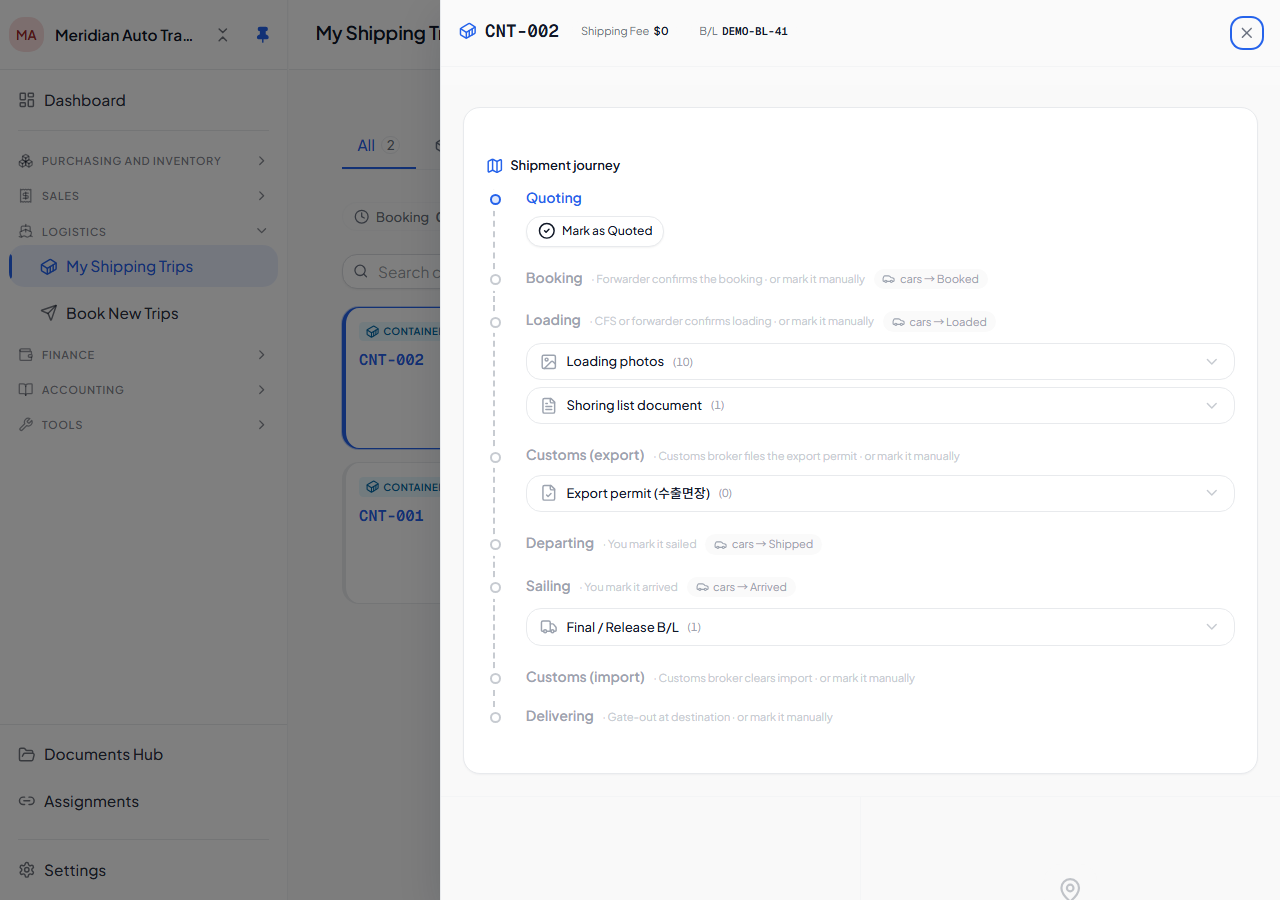
The Shipment Journey (8 stages)
Section titled “The Shipment Journey (8 stages)”The trader-facing detail view is a richer 8-stage Shipment Journey, tracked separately from the trip’s simple status via the trip_stage_confirmations ledger:
quote → booking → loading → customs_export → sailed → arrived → customs_import → deliveredAny partner (forwarder, CFS, customs broker) can raise a stage as pending; the trader who owns the trip then accepts or rejects it. Only the trader can confirm, manually advance, reject, or revert a stage — partners can only raise pending milestones.
Car status is commercial-only (in_stock / sold / cancelled — see Cars status workflow) and is never written by the journey. Instead, confirming certain stages moves the car’s derived Whereabouts (a display-only phase, not the car’s status field):
| Stage confirmed | Whereabouts effect |
|---|---|
booking | booked |
loading | loaded |
sailed | shipped |
arrived | arrived |
quote, customs_export, customs_import, delivered | operational only — no Whereabouts change |
Timeline view
Section titled “Timeline view”Open a container or RORO detail to see the <ShipmentJourney> widget — the 8-stage timeline with per-stage state (done / pending / current / upcoming), who raised each pending milestone, and confirmation timestamps. The container’s event log (container_events) still feeds an expandable raw timeline underneath.
Accept, reject, or manually advance
Section titled “Accept, reject, or manually advance”As the trip owner you can:
- Accept a partner-raised pending stage — confirms it and applies any Whereabouts effect.
- Reject a pending stage — sends it back to the partner with an optional note; no advance.
- Manually advance a stage yourself, without waiting for a partner to raise it.
- Revert the most-recently-confirmed stage (single-step undo).
Stages must be confirmed in sequence — you can’t skip ahead.