

Financial reports
The Financial Reports page (/financial-reports) is where an operator or accountant runs the standard set of reports without needing to know accounting codes or GL mechanics. Everything on this page is calculated live from your posted transactions — there’s no separate “run report” batch job.
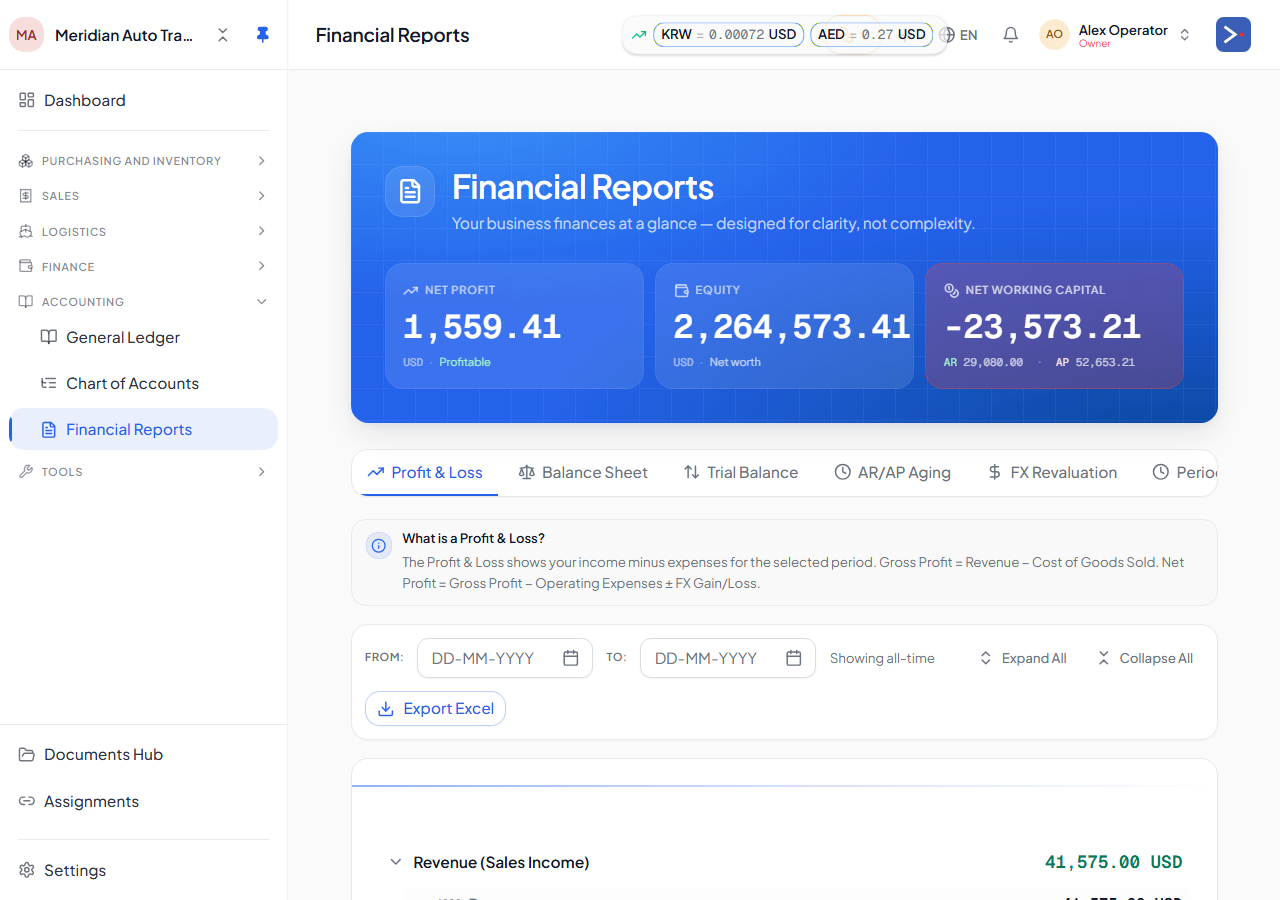
What you can run
Section titled “What you can run”The page is organized into tabs:
- Profit & Loss — income minus expenses for a chosen date range, with gross profit (Revenue − Cost of Goods Sold) and net profit called out. FX gains and losses are shown separately from operating revenue and expenses so they don’t distort the operating picture.
- Balance Sheet — what the company owns (assets), owes (liabilities), and what’s left for the owners (equity), as of a chosen date. The page checks that Assets = Liabilities + Equity and flags it if not.
- Trial Balance — every active account with its running debit/credit balance, as of a chosen date. This is the accountant’s view of the same underlying numbers.
- Aging (AR/AP) — open receivables and open payables grouped into aging buckets (current, 1–30, 31–60, 61–90, 90+ days), so you can see who owes you and who you owe, and for how long it’s been outstanding.
- FX Revaluation — unrealized gain/loss on foreign-currency balances as of the reporting date.
- Period Lock — close a fiscal period so posted numbers behind that date become immutable.
Choosing a period
Section titled “Choosing a period”- Profit & Loss takes a from/to date range.
- Balance Sheet, Trial Balance, and Aging take a single “as of” date — they show a snapshot at that point in time, not a range.
- Leaving the date blank shows the report as of today (or, for P&L, since inception).
If your company has a closed period (see Period Lock), reports run against dates in that closed period return the frozen numbers as they stood when the period was locked.
Currency presentation
Section titled “Currency presentation”Every report shows amounts converted to your company’s home currency, using the rate booked at the time each transaction was recorded (not today’s spot rate). The reports don’t let you switch to a different presentation currency — home currency is the single source of truth for these totals. If you deal in multiple transaction currencies, the underlying rows still carry their original currency; the home-currency column is what rolls up into report totals.
Excel export
Section titled “Excel export”Profit & Loss and Balance Sheet support Excel export — the export button builds a spreadsheet reflecting exactly what’s on screen for the period/date you selected, so you can hand it to a stakeholder or archive it outside the platform.
Who can see this page
Section titled “Who can see this page”Access is gated on the financial_reports permission section. Whether a role can view, and whether it can also lock/reopen periods, is controlled per-role from the Team settings — see Sections & roles.
Related
Section titled “Related”- How your money flows
- Trial balance & reports — the accounting-detail companion to this page
Change log
Section titled “Change log”| Updated on | Feature / change | Reason |
|---|---|---|
| 2026-07-07 | New page created | Financial Reports page had no lighter, non-jargon operator-facing doc |