

Multi-currency & FX
이 콘텐츠는 아직 번역되지 않았습니다.
Export119 is built around multi-currency from the first row of code. The accounting follows IAS 21 (The Effects of Changes in Foreign Exchange Rates) with a per-vault cost-basis model.
Home currency is permanent
Section titled “Home currency is permanent”Your home currency is the currency your financial statements are denominated in. It’s set at sign-up and locks the moment you record your first car purchase. Changing it after would require re-translating every historical GL row at retroactive rates — the platform doesn’t support that. The only escape hatch is a platform-admin reset of accounting data (only viable before any real data exists).
Choose your home currency to match the country you do your books in:
- Libya-based trader → LYD
- Korea-based exporter → KRW or USD
- UAE-based distributor → AED or USD
Per-vault cost basis
Section titled “Per-vault cost basis”Every foreign-currency vault carries two numbers:
| Field | Meaning |
|---|---|
| Native balance | Sum of Dr − Cr of native amount on the vault’s leaf account. Live from GL. |
homeBalanceAtCost | The home-currency cost basis of that native balance. Updated on every deposit/withdrawal. |
The implied average cost rate is homeBalanceAtCost / native balance. It’s the weighted-average rate at which the money currently in the vault was brought in.
What “cost basis” buys you
Section titled “What “cost basis” buys you”When you spend foreign-currency money on a car or transfer between vaults, the platform releases at the vault’s average cost rate (not the spot rate of the day). The difference between the spot rate and the cost rate is the realized FX gain or loss.
Example:
- Buy 10,000 USD into your USD vault at 4.85 LYD/USD. Cost basis = 48,500 LYD.
- Buy another 10,000 USD next month at 5.10 LYD/USD. Cost basis = 99,500 LYD for 20,000 USD. Average = 4.975 LYD/USD.
- Today’s spot is 5.20. You spend 5,000 USD on a car.
- Native side: vault drops to 15,000 USD. Cost side: 5,000 × 4.975 = 24,875 LYD released into the car’s inventory line.
- Realized FX gain = (5,000 × 5.20) − (5,000 × 4.975) = 1,125 LYD → posts to 4900 FX Gains.
This is what IAS 21 calls the realized portion. The remaining 15,000 USD in the vault continues to carry the 4.975 cost rate.
Position value vs cost basis
Section titled “Position value vs cost basis”Two different rates apply depending on the question you’re asking:
| Question | Rate used | Where you see it |
|---|---|---|
| ”What is this money worth right now?” | Today’s spot (closing) rate | Vaults page hero, Dashboard Cash Position, Net Worth widget |
| ”What did this money cost / what’s the realized FX on spending it?” | The vault’s cost basis (average cost rate) | Realized FX gain/loss on spend or exchange |
So the Vaults page hero and the per-currency cards value foreign vaults at today’s spot rate, not cost basis. Cost basis (homeBalanceAtCost) stays under the hood and is used only to compute realized FX when money leaves the vault — it is never a presentation figure for “what you hold today.”
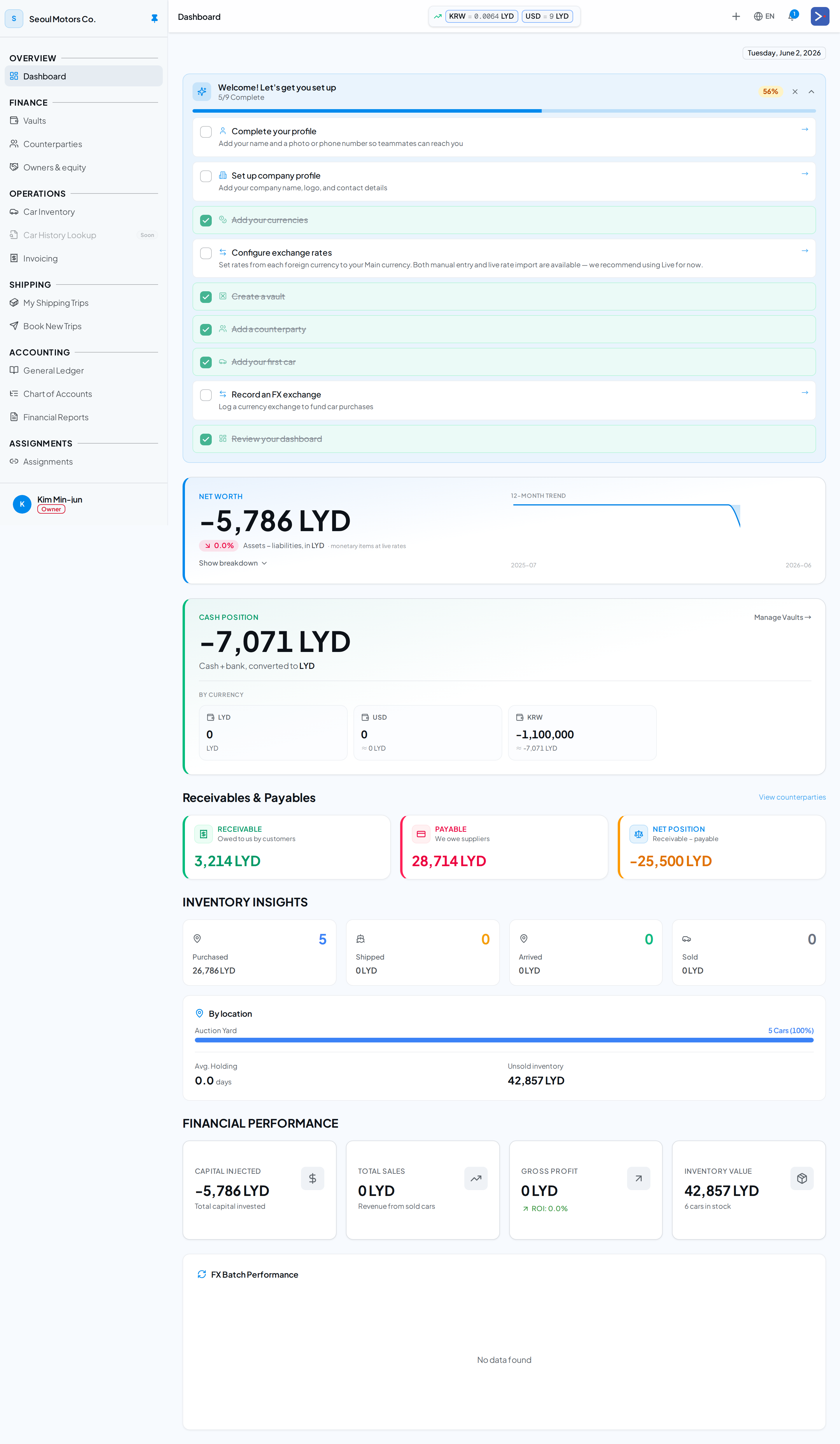
Dashboard — Net Worth and Cash Position both value foreign holdings at today’s spot rate.
Active rates: manual vs live
Section titled “Active rates: manual vs live”Each foreign currency has a rate-source preference — Manual or Live — set on /currencies → Spot rates → Active rates. The active rate is the latest rate of your preferred source on or before today, with an automatic fallback to the other source if your preferred source has no rate yet.
- Manual — you enter the rate (e.g. the parallel/market rate your exchange office actually trades at).
- Live — auto-imported from the FX provider (typically the official rate).
Every valuation surface — the Active rates cards, the Vaults hero, the Dashboard Cash Position, and the Net Worth widget — uses this active rate, not merely the most recently entered row. Importing a live rate does not override a manually-pinned rate unless that currency’s preference is set to Live.
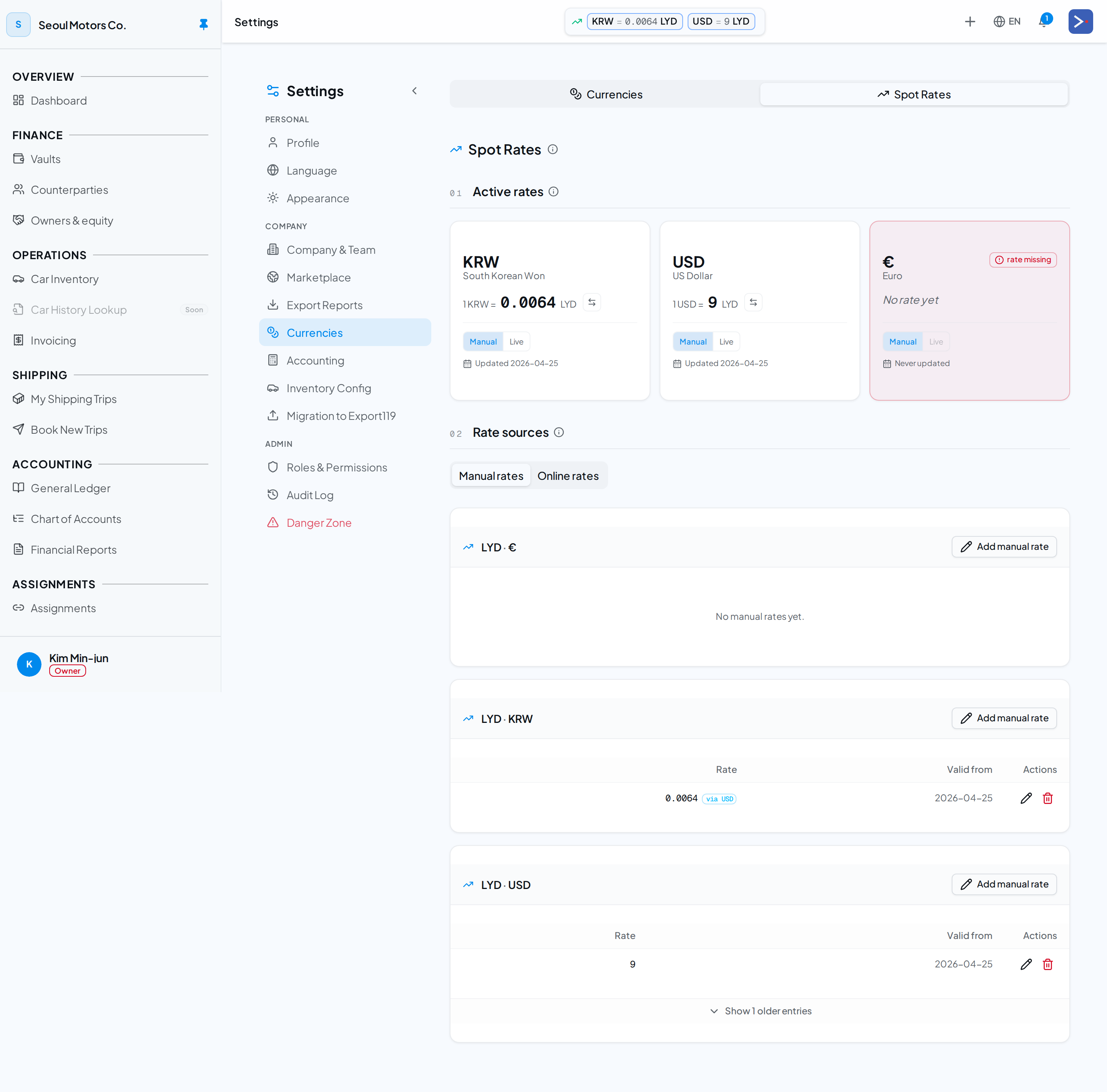
Settings → Currencies → Spot Rates. Each currency’s Active rate card carries a Manual/Live toggle; the per-pair cards below hold the underlying manual and online rows.
Cash on hand vs owed to vaults (no netting)
Section titled “Cash on hand vs owed to vaults (no netting)”A vault can go negative when a counterparty — typically an exchange office — lends you money. That is a real borrowing (a financial liability), not negative cash. Under IAS 1.32 / IAS 32.42 you may not offset it against the cash sitting in another vault, so Export119 presents the two gross:
- Cash on hand — the sum of positive vaults (at the active spot rate).
- Owed to vaults (Negative balance/overdraft) — the sum of the negative vaults, shown separately as a liability.
On the Vaults hero this appears as its own line, with Net position = cash on hand − owed. On the Dashboard Net Worth widget each overdrawn vault is regrouped from the cash/bank asset bucket into a liability line. This is presentation only — your net worth doesn’t change; the overdraft simply moves from the asset side to the liability side, which is what IAS 1 requires.
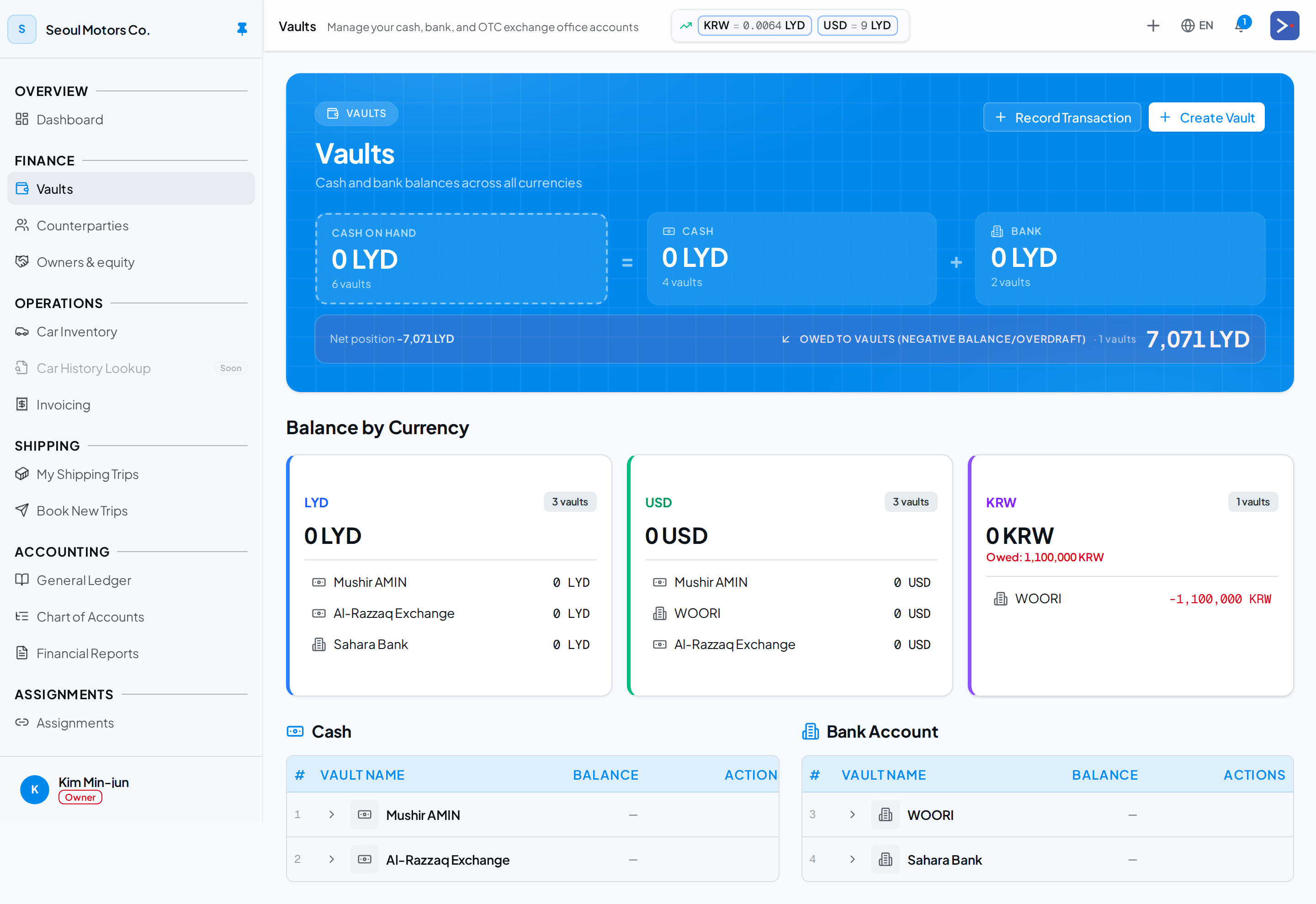
Vaults hero — positive vaults sum into “Cash on hand”; negative vaults are shown gross as “Owed to vaults”, never netted against the cash.
Direct fund deposit (no FX)
Section titled “Direct fund deposit (no FX)”You can also deposit native-into-native with no FX exposure:
- Receive 5,000 USD as customer payment into your USD vault. No spot rate needed — the vault’s cost basis increments at 1:1 native-to-native. No FX gain/loss.
Vault-to-vault FX exchange
Section titled “Vault-to-vault FX exchange”To move money between vaults of different currencies, use the FX Exchange Center — pick from-vault, to-vault, spot rate, amount, and the platform posts a 4-leg GL entry with realized FX on the from-side. See FX Exchange Center.
Period-end revaluation
Section titled “Period-end revaluation”For monetary items still denominated in foreign currency at period end (open AR/AP in USD when home is LYD), IAS 21 requires re-translating at the period-end spot rate. Export119 exposes a Run FX Revaluation button under /financial-reports/fx-revaluation that does this manually — pick a date, the platform computes the revaluation entries and posts them.
Rate formatting
Section titled “Rate formatting”FX rates are stored to 6 decimal places and rendered to 2–6 decimals as appropriate. Never toExponential — always fixed-point.
Related
Section titled “Related”- FX Exchange Center
- Chart of Accounts — 4900 / 5900 FX accounts
- Migration step 1: Currencies — initial setup